> For the complete documentation index, see [llms.txt](https://gyansetu-sql.gitbook.io/sql-programming/llms.txt). Markdown versions of documentation pages are available by appending `.md` to page URLs; this page is available as [Markdown](https://gyansetu-sql.gitbook.io/sql-programming/sql-select/sql-joins/sql-right-join-keyword.md).
# SQL RIGHT JOIN Keyword
### SQL RIGHT JOIN Keyword
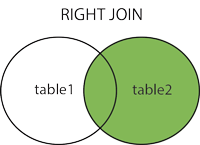
The RIGHT JOIN keyword returns all records from the right table (table2), and the matched records from the left table (table1). The result is NULL from the left side, when there is no match.
#### RIGHT JOIN Syntax
```sql
SELECT column_name(s)
FROM table1
RIGHT JOIN table2 ON table1.column_name
= table2.column_name;
```
**Note:** In some databases RIGHT JOIN is called RIGHT OUTER JOIN.
### Demo Database
In this tutorial we will use the well-known Northwind sample database.
Below is a selection from the "Orders" table:

\
And a selection from the "Employees" table:

\
SQL RIGHT JOIN Example
The following SQL statement will return all employees, and any orders they might have placed:
```sql
SELECT Orders.OrderID, Employees.LastName,
Employees.FirstName
FROM Orders
RIGHT JOIN Employees ON Orders.EmployeeID
= Employees.EmployeeID
ORDER BY Orders.OrderID;
```